MyRadar Weather Radar
- 4.8
- Rating
- 10.00M
- Installs
- Free
- Price

 Analysis by App-foxy
Weather apps are easy to judge on a calm morning and much harder to judge when I am already outside, carrying groceries, walking to a bus stop, or deciding whether a short trip is worth the risk of rain. That is where MyRadar Weather Radar makes its case. Developed by ACME AtronOmatic LLC, this free weather app focuses on radar and highly local rain awareness rather than trying to be an all-purpose lifestyle dashboard. I found it most useful when I wanted a quick answer to one practical question: is rain moving toward me soon, and should I change what I am doing?
My experience with MyRadar Weather Radar was shaped by that narrow purpose. It is not simply a screen full of temperatures and icons. Its identity comes from the map, the radar view, and the attempt to turn nearby precipitation into a more immediate warning. The app is available for Android and iOS, is rated for Everyone, and is free to install, with optional purchases ranging from a few dollars to several dozen dollars per item. That makes it easy to try without committing money first, although the value of paid extras depends on how seriously you use weather information.
How the radar behaves when the network matters
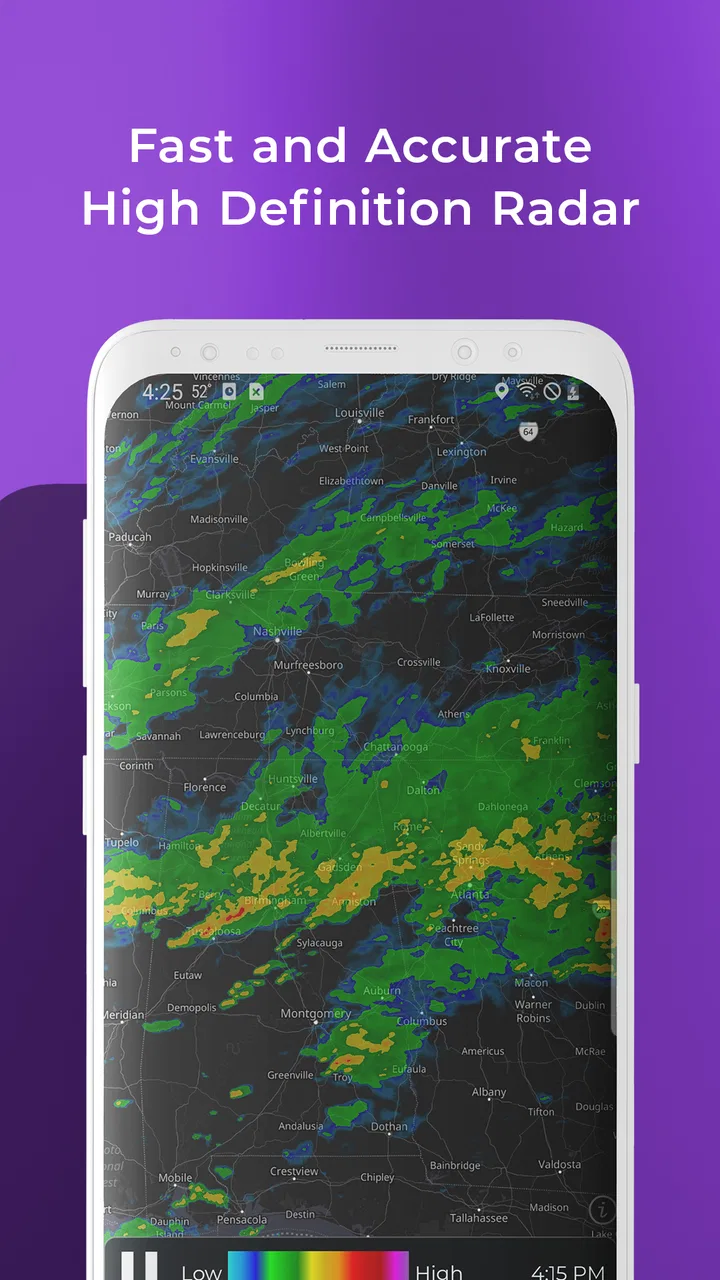
The first thing I noticed is that the app feels most convincing when I have a working connection and can let the radar map load properly. A radar display is inherently tied to current information, so the experience depends on receiving fresh weather data rather than merely opening a static forecast. When the connection is good, the map gives me a more useful sense of movement than a single rain icon in a standard phone weather widget.
You May Also Like

 Blood Strike: 2.5 Anniversary
Blood Strike’s Loadouts Turn Every Drop Into a Tactical Gamble
A close look at Blood Strike’s custom loadouts: how fast access to signature weapons reshapes its battle royale rhythm, rewards preparation, and narrows the gap between fights.

 Pandora - Music & Podcasts
Pandora’s Music Is Easy to Start, but Harder to Recover
Pandora’s strength is its low-effort path from a seed to a station. Its weak spot is how much confidence it asks you to place in connection, setup, and quiet recovery.

 8 Ball Pool
 Is Built on Rivalries, Rematches, and Routine
A close look at the rivalries, rematches, shared routines, and unanswered safety questions that turn a quick pool match into a persistent mobile community.

 Samsung Music
’s Quiet Strength Is Playing What You Already Own
Its reach comes less from spectacle than from dependable access to a personal library. That simplicity is both the app’s strongest retention engine and its ceiling.

 AccuWeather: Weather Radar
AccuWeather Review: A Quick, Clear Forecast for Everyday Decisions
For everyday plans, the best forecast is the one you can understand quickly. AccuWeather makes rain timing, radar, and local conditions easy to act on, with a few trade-offs.

 Hill Climb Racing
Why Hill Climb Racing Still Turns Crashes Into One More Run
A tiny car, a bumpy hill and one more upgrade: Hill Climb Racing keeps resurfacing because its simple chaos makes every near-miss feel personal.
More From Our News Desk
View All News


This changes how I read the forecast. Instead of asking only whether rain is predicted for the afternoon, I can look at the pattern around my location and judge whether the weather is approaching, passing nearby, or spreading across a wider area. That distinction matters when I am deciding whether to leave now, wait a little, or take an umbrella. The app’s hyperlocal rain-alert focus is particularly helpful for short-term decisions, where a broad city forecast can feel too vague.
There is also a trade-off here. A radar map can look more precise than the weather really is. Seeing colored movement on a screen may encourage me to believe I know exactly what will happen at my street, even though rain can weaken, split, or change direction. I treat the display as decision support, not a promise. For a quick walk, that is usually enough. For a long drive, outdoor work, or a safety-critical plan, I would still check wider forecast information and official warnings.
The app’s patent-pending technology is part of its identity, but the practical test is whether the information helps me act. In that respect, the strongest use is not staring at the animation for entertainment. I get more value by opening it immediately before a planned activity, checking the nearby pattern, and then checking again if conditions look unsettled. The radar is most useful as a current snapshot that supports a decision, not as something I leave open and assume will solve every forecast question.
Why a radar map can beat the usual weather icon
Most built-in weather tools are excellent for quick temperature checks. They often answer whether the day will be warm, cold, dry, or wet in broad terms. MyRadar Weather Radar serves a different moment: I already know rain is possible, and I need to understand its timing and direction. That makes it a useful companion to a normal forecast rather than a complete replacement for one.
For example, if my phone’s regular forecast says there is a chance of showers later, that information does not tell me much about leaving the house in ten minutes. A radar view can give me a better basis for deciding whether to walk, cycle, or postpone. The difference is especially noticeable in places where showers are scattered and conditions can vary between neighborhoods.
Still, people who mainly want tomorrow’s high and low temperatures may find the radar emphasis unnecessary. If I only need a simple daily forecast, a built-in weather app can be faster and less visually demanding. MyRadar is better suited to someone who regularly makes short-term plans around rain and wants more than a generic percentage.
Using it in real mobile situations
I think the app makes the most sense on a phone because its core question usually appears away from a desk. Imagine leaving work with a backpack, seeing dark clouds, and wondering whether to take the train or walk. I can open the map, check what is happening nearby, and make a practical choice before committing to the route. That is a small use case, but it is exactly the kind of repeated decision that makes a focused weather tool worthwhile.
Another useful scenario is managing errands. If I need to walk to a shop, collect a child, or take a dog outside, I do not necessarily need a detailed forecast for the whole day. I need to know whether the next part of the day looks manageable. A radar-centered app can reduce that uncertainty, especially when the weather is changing quickly.
For cycling and walking, I would use the app as a timing aid rather than a route planner. I might check it before leaving, identify whether a rain band is moving toward my area, and choose to wait or shorten the trip. The important insight is that the app can help me avoid unnecessary exposure, but it cannot judge road conditions, visibility, wind hazards, or flooding on my behalf. The map answers one part of the question; common sense and local awareness still handle the rest.
Travelers should also understand the limits of relying on a radar screen in unfamiliar places. A location change may require the app to update its view, and the usefulness of the result depends on current connectivity. I would check before leaving a hotel or station rather than waiting until I am already in a poor-signal area. That habit reduces the chance of making a plan based on an old view.
Notifications are useful only when they fit your routine
Rain alerts sound convenient, but I would not enable every possible notification without thinking about how I use my phone. An alert can be valuable before a commute or outdoor appointment, yet irritating if it arrives too often or at moments when I cannot act on it. I prefer to treat alerts as a prompt to look at the radar, not as a substitute for opening the app and checking the situation myself.
A good personal workflow is to use alerts for awareness and the map for confirmation. If I receive a warning while preparing to leave, I can inspect the current pattern and decide whether it affects my route. That two-step approach is more reliable than reacting automatically to a notification, particularly when a shower is nearby but not actually moving toward my location.
This is also where the app may not suit everyone. People who dislike weather notifications, keep battery use tightly controlled, or rarely need short-term rain guidance may prefer a simpler forecast widget. MyRadar’s focused alerts are a strength for active users, but they can feel like extra noise for someone who checks weather only once in the morning.
What happens when the connection is weak
Connectivity is not a minor detail for a radar application. The experience is strongest when the app can retrieve current information and display the map without delay. In a basement, crowded station, rural road, or overloaded mobile network, I would expect more friction than I get from a basic temperature widget. That is not a flaw unique to this app; it is a consequence of using live, map-based weather information.
My practical advice is to check the radar before entering a place where the signal may disappear. If I am heading out for a hike, a long drive, or an outdoor event, I would not wait until the last minute to make every weather decision. I would look at the conditions while connected, note the broad direction of the weather, and keep a backup plan. That workflow is more realistic than assuming a live radar app will always be available at the exact moment I need it.
When loading is slow, the temptation is to keep refreshing repeatedly. I find that unhelpful. A better approach is to give the map a moment, verify whether the location is correct, and then use the most recent useful view alongside what I can see outside. If the sky is already changing quickly, the app should support observation rather than override it.
Recovery after a poor connection is another reason to keep expectations sensible. Once service returns, I would reopen or refresh the relevant view before making a new decision. A map that was useful earlier may no longer represent the same situation. The key habit is to distinguish between information that is current and information that was merely the last thing displayed.
Why this matters more on the move
At home on a strong Wi-Fi connection, the app feels straightforward. On the move, several variables arrive at once: location changes, network quality changes, and the weather itself may be evolving. That makes preparation more important than the app interface alone. I would use it before boarding a bus, starting a walk, or leaving an event, rather than treating it as a guaranteed emergency tool.
This limitation also clarifies who should skip it. If you need dependable information in remote areas with unreliable service, a radar app should not be your only weather resource. If you require detailed marine, aviation, wildfire, or severe-weather guidance, a specialized official source may be more appropriate. MyRadar is strongest for everyday rain awareness, not every possible form of environmental risk.
Keeping mobile data use under control
Because the app centers on maps and current weather information, I would use it deliberately when mobile data matters. I do not need to leave the radar running continuously while doing unrelated tasks. A quick check before going out, followed by another check when plans change, gives me most of the practical benefit without turning the app into a constant background habit.
On a limited data plan, the most sensible routine is to use Wi-Fi for longer browsing and reserve mobile access for decisions that actually affect the next hour or two. I would also avoid repeatedly zooming, panning, and refreshing just to watch the map. The radar is a tool for answering a question, so I close it once I know whether I am changing my plan.
There is a subtle trade-off between detail and efficiency. A wider view helps me understand the general movement of a weather system, while a closer view helps me judge my immediate area. I start wide, then zoom in only when I need local context. That is faster than beginning with a highly detailed map and trying to interpret every nearby patch of precipitation.
People considering the optional purchases should think about their actual routine rather than assuming paid features are automatically necessary. The free entry point makes the app easy to test, while in-app items cost between a few dollars and nearly thirty dollars each. I would first use the basic experience during several real rain decisions. Only someone who genuinely benefits from additional capabilities should consider spending more.
A simple workflow for commuters and outdoor plans
Before leaving, open the radar while connected and check the area around the destination, not only the starting point.
Look for the direction and shape of nearby precipitation, then compare that with the time your trip will take.
If the situation looks uncertain, choose a flexible option such as delaying departure, carrying rain protection, or shortening the route.
Check again when plans change, but avoid treating repeated refreshes as a guarantee of perfect precision.
This workflow is more useful than simply asking whether the app is “accurate.” Weather decisions are contextual. The same radar picture may be acceptable for a short walk and insufficient for a long outdoor event. MyRadar gives me a fast visual aid, but I still have to match the information to the consequences of being wrong.
Who gets the most value from it
I would recommend this app to commuters, walkers, cyclists, dog owners, parents, and anyone who frequently makes short outdoor plans. It is especially appealing if the standard weather app on your phone feels too general when showers are moving through. The radar-first approach makes sense for people who care about what is happening nearby right now, not only what the day’s forecast says in summary.
The app also has a reassuringly established presence. It has been available since January 24, 2012, and has grown to over ten million installs. Its average rating is 4.8 from around three hundred twenty-five thousand ratings, with roughly one hundred twenty thousand written reviews. Those figures do not prove that every user will enjoy the interface or find every prediction useful, but they do suggest that the focused concept has broad appeal.
I would be more cautious about recommending it to someone who wants a single complete weather center containing every possible detail. The app’s central strength is rain awareness through radar. If your priorities are long-range planning, detailed climate information, specialized hazard reporting, or minimal visual complexity, another weather service may fit better. The right choice depends on whether immediate precipitation movement is a frequent problem in your day.
Age suitability is straightforward because the app carries an Everyone content rating. That makes it suitable as a general household weather tool, although adults should still teach children not to treat a colorful radar map as a safety guarantee during storms or dangerous conditions.
My connectivity verdict
MyRadar Weather Radar works best when I use it as a connected, on-demand decision tool. Its radar view gives me more context than a basic weather icon, and its hyperlocal rain-alert focus is genuinely useful for deciding whether to leave now, wait, or change a short outdoor plan. I particularly like the way it turns an uncertain “maybe rain later” forecast into a visual question about what is approaching my area.
At the same time, connectivity shapes the experience from start to finish. A weak signal can make a live map less convenient than a simple forecast, and I would not depend on it as my only source in remote areas or serious weather situations. The smartest use is to check while connected, interpret the radar with some humility, and keep an alternative plan when the cost of being wrong is high.
For me, the app earns a recommendation because it solves a specific everyday problem well. It is free to try, available to a broad audience, and focused enough to become part of a commute or outdoor routine. If rain timing affects your plans more often than the daily temperature does, this is one of the weather apps I would keep installed. If you only want a quick forecast glance or need dependable information without a live connection, I would choose a simpler or more specialized alternative instead.
FAQs for MyRadar Weather Radar
01What features does MyRadar Weather Radar offer?
MyRadar Weather Radar provides real-time weather updates, including animated radar visuals that help you track storms and rainfall. It offers detailed forecasts, weather alerts, and aviation layers for pilots. The app also integrates hurricane tracking and includes a widget for quick access to weather conditions.
02Is MyRadar Weather Radar free to use?
Yes, MyRadar Weather Radar is free to download and use. However, it offers in-app purchases for premium features such as removing ads, accessing additional radar layers, and advanced storm tracking capabilities. These purchases enhance the overall user experience but are optional.
03How accurate is the weather data in MyRadar Weather Radar?
MyRadar Weather Radar is known for its accuracy and reliability. It uses data from the National Weather Service and other reputable sources, ensuring timely and precise updates. The app’s high-resolution radar and forecasting tools provide detailed insights into local and regional weather patterns.
04Can I customize notifications in MyRadar Weather Radar?
Yes, MyRadar Weather Radar allows users to customize notifications according to their preferences. You can set alerts for severe weather conditions, rain, wind, and other specific weather events. This feature helps users stay informed and prepared for any weather changes in their area.
05Does MyRadar Weather Radar require an internet connection?
Yes, MyRadar Weather Radar requires an internet connection to provide updated data and radar animations. While some basic features may be accessible offline, the app’s full functionality, including real-time weather updates and alerts, relies on an active internet connection.
Pros
- User-friendly interface for quick navigation.
- Real-time weather alerts keep you informed.
- Customizable layers for detailed weather data.
- Accurate radar updates with minimal delay.
- Free version offers plenty of features.
Cons
- Ads can be intrusive in the free version.
- Advanced features require a subscription.
- Battery usage can be high on some devices.
- Limited offline functionality available.
- Occasional minor bugs reported by users.

MyRadar Weather Radar
Gallery